pradipdorik
New member
- Dealer Name
- Jio
- Company Name
- Jio
- Customer Care Number
- 1800 896 9999
- Loss Amount
- 0
- Ratings
- 1.00 star(s)
I am facing a critical issue with Jio AirFiber where the Zscaler Client Connector is unable to establish a secure connection.
Here the below Connection Details
* Customer Name: Pradip Dorik
* Jio AirFiber Number / Service ID +912563355338
* Registered Mobile Number: +918378835682
*Serial No: RTHHGIKA0265749
* Mac ID: ec:91:61:1b:cc:59
* Firmware Version: JIO_JIDU6J11_R3.2
*IPv6 address: 2409:4090:20a1:c400:b44:4eec:6963:5a3a
* Location: Shirpur Maharashtra 425427
Issue Summary:
• Zscaler works perfectly on other internet providers.
• The problem occurs only when connected through Jio AirFiber.
• Due to this, I am unable to connect to my corporate VPN and perform my office work.
• Multiple troubleshooting attempts have already been completed, but the issue still persists.
I request the Jio Network Engineering and Technical Support teams to investigate whether this is related to routing, CGNAT, DNS, IPv6, MTU, or firewall policies affecting Zscaler traffic.
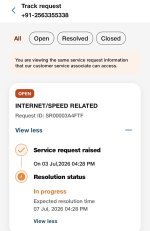
As the Support ticket ‘SR00003A4FTF’ already have been created for this issue on 3rd of July 2026 but no updates from Jio Team
The problem is zscaler keep on connecting/disconnecting frequently due to which i am unable to work on remote desktop. Also my internet connectivity is good and all other app working well even teams call.
If anyone from the Jio technical team has experienced similar cases or can help escalate this internally, your support would be greatly appreciated.
Thank You!
Regards
Here the below Connection Details
* Customer Name: Pradip Dorik
* Jio AirFiber Number / Service ID +912563355338
* Registered Mobile Number: +918378835682
*Serial No: RTHHGIKA0265749
* Mac ID: ec:91:61:1b:cc:59
* Firmware Version: JIO_JIDU6J11_R3.2
*IPv6 address: 2409:4090:20a1:c400:b44:4eec:6963:5a3a
* Location: Shirpur Maharashtra 425427
Issue Summary:
• Zscaler works perfectly on other internet providers.
• The problem occurs only when connected through Jio AirFiber.
• Due to this, I am unable to connect to my corporate VPN and perform my office work.
• Multiple troubleshooting attempts have already been completed, but the issue still persists.
I request the Jio Network Engineering and Technical Support teams to investigate whether this is related to routing, CGNAT, DNS, IPv6, MTU, or firewall policies affecting Zscaler traffic.
As the Support ticket ‘SR00003A4FTF’ already have been created for this issue on 3rd of July 2026 but no updates from Jio Team
The problem is zscaler keep on connecting/disconnecting frequently due to which i am unable to work on remote desktop. Also my internet connectivity is good and all other app working well even teams call.
If anyone from the Jio technical team has experienced similar cases or can help escalate this internally, your support would be greatly appreciated.
Thank You!
Regards